MP3 Bitrate Explained: 128 vs 192 vs 320 kbps and What You Actually Hear
Two people can own “the same MP3” and hear two different songs. One file is a thin, slightly hazy 128 kbps copy. The other is a fuller 320 kbps one. The number behind that difference is the bitrate, and it is the biggest reason one MP3 sounds better than another. It is also widely misunderstood, because a bigger number doesn’t always mean better sound.
This guide covers what bitrate is, what each common setting sounds like, where SoundCloud fits in, and how to choose a setting without wasting storage.
What bitrate actually means?
Bitrate is the amount of data used to describe one second of audio, measured in kilobits per second (kbps). MP3 is a lossy format. To shrink a recording, the encoder discards detail most ears are unlikely to notice, such as quiet sounds masked by louder ones. The bitrate sets the budget: a larger budget lets the encoder keep more, and a smaller one forces harder cuts.
Bitrate also determines file size, and you can work it out yourself. Divide kbps by 8 to get kilobytes per second, then multiply by the length of the track. For a four-minute song:
| Bitrate | Approx. file size | Typical fit |
| 128 kbps | 3.8 MB | Speech, podcasts, background listening |
| 192 kbps | 5.8 MB | Everyday music on phones and in cars |
| 256 kbps | 7.7 MB | Music you listen to closely |
| 320 kbps | 9.6 MB | Highest MP3 setting, fixed-rate compatibility |
What you can actually hear?
At 128 kbps, on decent headphones or speakers, cymbals, reverb tails and busy passages can sound slightly smeared or “watery.” Spoken word usually sounds fine, which is why 128 kbps remains common for podcasts.
Around 192 kbps is where many listeners start to struggle telling an MP3 from the original in blind tests on typical music. At 256 to 320 kbps, and with high-quality variable bitrate encoding, most listeners can’t reliably hear a difference, even with good gear.
Two caveats apply. First, “transparent” isn’t a fixed number. It depends on the track, the encoder, the playback equipment and the listener’s training. Second, your playback chain matters. On earbuds, over Bluetooth or in a noisy car, most of these differences disappear.
CBR vs VBR: why 320 isn’t automatically the winner
Constant bitrate (CBR) spends the same amount of data on every second, whether it’s a dense chorus or near silence. Variable bitrate (VBR) adapts as it goes, spending more on complex passages and less on simple ones.
The popular LAME encoder’s V0 preset averages roughly 245 kbps and peaks at 320 kbps. V0 is usually more efficient than 320 kbps CBR and often produces a smaller file, and 320 kbps is not automatically audibly better than a well-encoded V0 file. CBR 320 still has its place when a device or platform wants a fixed maximum rate, because it is simple and widely accepted.
Where SoundCloud fits?
SoundCloud adds a wrinkle, because what you hear there is already a compressed copy of what the artist uploaded. Its help center says standard tracks stream as 128 kbps MP3, while Go+ subscribers can switch on a 256 kbps AAC high-quality stream, which SoundCloud treats as comparable to a 320 kbps MP3. A newer help page describes the platform moving to AAC streams: free listeners get 96 and 160 kbps, and Go+ listeners also get 256 kbps. The exact figures vary by track and change over time, but the principle stays the same. The quality of the stream depends on the quality of the upload.
That means the best copy of a track is whatever the artist chose to share, and many enable downloads on their releases. If you want a track offline and you have the right to keep it, a tool such as downloadscloudmp3.com can save supported SoundCloud audio as an MP3 for offline listening. Just remember that the file can never sound better than the source it came from.
A note on rights: only download or convert audio you are entitled to use, such as your own uploads, tracks where the artist has enabled downloads, or music released under a licence that allows it.
The upscaling trap
This is the mistake that catches the most people. Suppose you take a track that streams at 128 or 160 kbps and export it as a 320 kbps MP3. The file is bigger, and the label says 320. But the audio inside can never be better than the lower-bitrate source, so the extra size buys nothing. It is like blowing up a thumbnail to poster size: more paper, same picture.
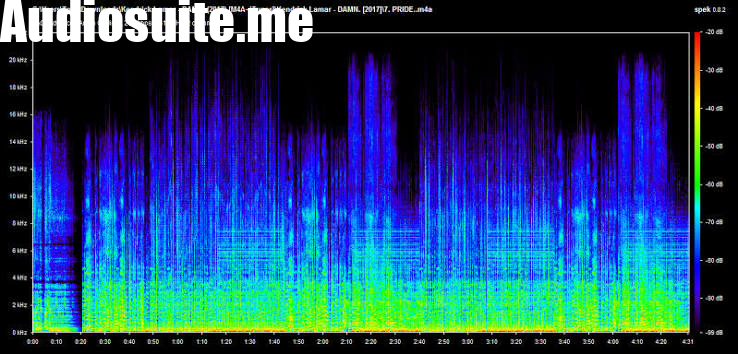
You can spot an upscaled file in two ways. The size is often too small for its label, and a spectrum analyser will usually show a hard cutoff in the high frequencies where the original encoding stopped. Players report the value in the file header, while an analyser measures what’s actually in the audio. The label tells you what someone claimed, and the spectrum tells you what you got.
Which bitrate should you choose?
Speech and podcasts: 96 to 128 kbps is typically clean for pure speech.
Everyday music on a phone, in the car or over Bluetooth: 192 kbps, or an equivalent VBR setting, is a sensible balance of size and sound.
Music you care about, or DJ libraries: 256 to 320 kbps CBR, or LAME V0.
Archiving: keep a lossless master in FLAC or WAV, and make MP3 copies from that. Never go the other way.
If you’re unsure, test it yourself. Take a familiar song, export it at two settings, and compare them blind on the headphones or speakers you actually use. If you can’t hear the difference, take the smaller file.
How to convert without losing quality?
1. Start with the best source you have. A WAV or FLAC master beats an MP3 every time.
2. Convert once, from the original. Every lossy re-encode costs a little more detail, so avoid chains like MP3 to MP3 or AAC to MP3 where you can.
3. Use a tool that handles your formats. A browser-based mp3 converter that accepts MP3, WAV, FLAC and M4A files lets you choose the output format without installing software.
4. Keep the original. Storage is cheap, and you can always make a new MP3 from a master, but you can’t rebuild a master from an MP3.
The takeaway
Bitrate is a budget, not a guarantee. Higher settings give the encoder more room, but past roughly 192 to 256 kbps most listeners on most equipment stop hearing the difference, and no setting can add detail that was never in the source. Pick the bitrate that suits how you listen, start from the best file available, and treat any “320 kbps” label with a little healthy suspicion until you’ve checked what’s inside.